I created the original post for this configuration back in July of last year and its seen quite a bit of traffic and had some great comments. I just thought with the release of Lync 2013 and some new interesting developments it would be worth adding new info and refreshing some of the content to better speak to Lync 2013.
What's this post all about?
While I am not about to promote the use of Cisco’s mobility feature to dual ring a Cisco phone and Lync, there is an interesting feature that could make your life easier if you insist on using it. Its called SIP URI dialing. This isn't a new feature as its been around since 7.x days or possibly earlier. It sparked my interest back in 2008 but I never really investigated it further until 2012.
SIP URI dialing is really a pretty basic concept. Instead of using a normal DID route pattern to designate a destination you use a SIP URI such as lyncuser1@contoso.com. By specifying @contoso.com as your SIP route you assign a SIP trunk that points to Lync. Its actually pretty simple and works with Cisco’s mobility feature used in Remote Destination Profiles.
There are some caveats with this feature though and its not terribly flexible. It does require some special configuration but could possibly make dial plans and migrations a little easier. Also you can remove the issue of requiring unique DID’s on both systems because now that your ringing between systems with a unique SIP URI using the same DID on both systems is much less problematic. So users don’t have to change numbers or use a new number for Lync, it can be the same as their Cisco IP phone.
To make things a little easier to understand, in this post I am referencing the To field in a SIP message when I am talking about Tel URI or SIP URI. I am using Tel or SIP to define trunk routing behavior even though both are configured as SIP trunks when configured in CUCM. Its just the routing behavior based on the address format I am trying to better define. Hope that’s not to confusing.
Why use it?
While working in the field I get a lot of questions from engineers around how do I make my Cisco phone and Lync ring at the same time. As I have covered here on my blog there are a couple of ways to do this from either CUCM, Lync or even potentially from a gateway. But there is a level complexity in regards to how to configure DID’s and how to make DID’s unique enough so that you can route between the two platforms. Well using SIP URI dialing instead of DID’s this simplifies this portion of the configuration and leaves Lync’s Sim Ring feature open for users to configure it for their cell phones. Using Sim Ring as the tool to ring a Cisco desk phone in my opinion is a waste of an easy to configure end user setting. I strongly believe this feature is better used to ring a cell phone or other devices self administered by the user.
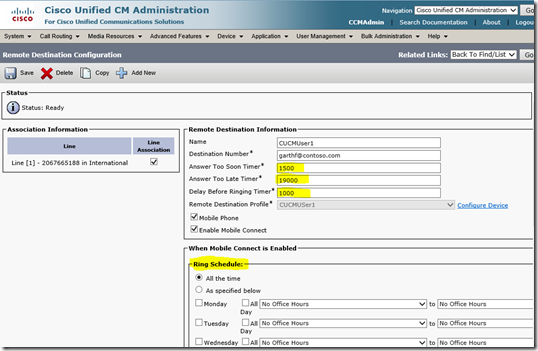
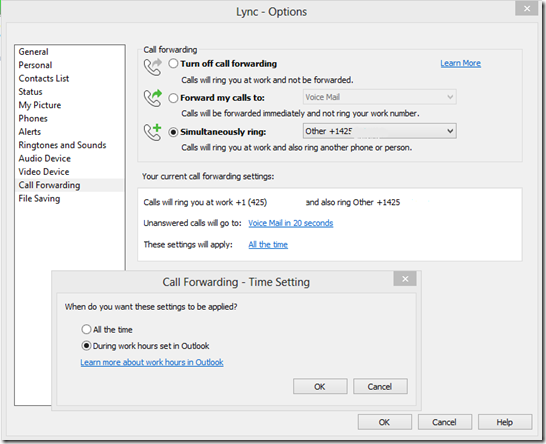
The interface for configuring Cisco Remote Destination Profiles is potentially very intimidating for normal users. There are settings and timers that if set incorrectly can cause issues. That’s why in my opinion RDP’s should be configured by an administrator and Sim Ring on Lync is a better choice for self service by the average user. There is only one timer and phone number fields can be prepopulated making the users phone number selection easy. Also Sim Ring has the ability to use the business hours set in Outlook where as Cisco’s RDP requires this to be recreated under the RDP profile.
From a self service point of view Lync allows the user to set Sim Ring and Business hours which are inherent in Outlook straight from within Lync. Timers for voicemail forwarding are available but other timers are system controlled and not exposed to users removing the potential to create issues. Sim Ring can also be changed by the user from all the mobile apps which is a nice add.
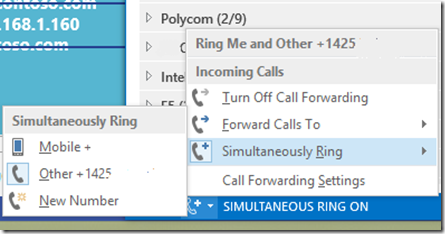
I am sure there are fans of the way Cisco does RDP and Single number reach but I am not one of them. Allowing users to change anything but the most simplest of timers has the potential to cause issues and is best left to an admin in my opinion.
Caveats for SIP URI dialing?
The single biggest caveat for SIP URI dialing is that when you create a SIP Route pattern in CUCM it does not allow assigning a route group to it. You have to directly assign a trunk to the route pattern. The main issue is that once assigned to the SIP route pattern you can no longer assign the same trunk to a route group which limits your options. The best way to deal with this is to have a SIP trunk just for SIP URI routing. In CUCM 8.6 you can have multiple endpoints (in our case mediation servers) assigned within a SIP trunk which means that this isn't a redundancy problem. Its more a configuration issue on the CUCM side but since this configuration is for a specific purpose I don’t consider this a show stopper.
With Lync 2013 this trunk can now have its own port within the Lync trunk configuration. This means we can create a trunk with its own rules on either system. It really doesn’t mean that its simpler but certainly more configurable from a call control point of view.
How to set it up?
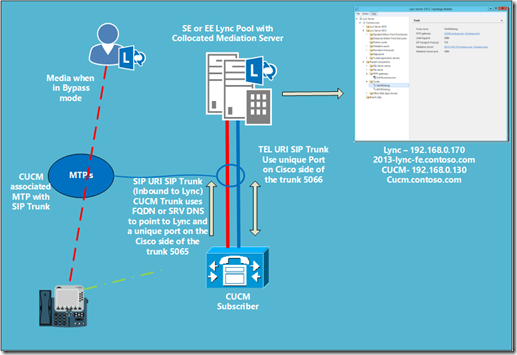
The easiest way to do the setup is to follow this guide with a few alteration which I will call out below. This is the Microsoft produced guide which I prefer over the Cisco guide. In the Microsoft guide they make use of Calling Search Spaces (CSS) which gives a more complete picture of the settings required. In the Cisco guide there is no call authorization setup so unless you know which CSS to configure you could easily miss a setting as there are multiple places to set CSS on various pages. The one that caught me out was the rerouting CSS on the Remote Destination Profile.
What's needed for Lync?
The SIP URI trunk is for inbound use only. This means that setup on the Lync is pretty simple if you already have a SIP trunk setup for your CUCM deployment. As long as your CUCM servers are already added to the topology as gateways you are already done. Just make sure that the inbound SIP URI trunk to Lync is using already established ports.
In Lync Server 2013 we can take the configuration a little further than 2010. We can define individual trunks for each dialing type. Like I said earlier this doesn’t make it simpler to configure but it can make the configuration clearer to understand. Now we have two well define trunks to the same gateway and we can name it accordingly so we have a clear understanding of the configuration.
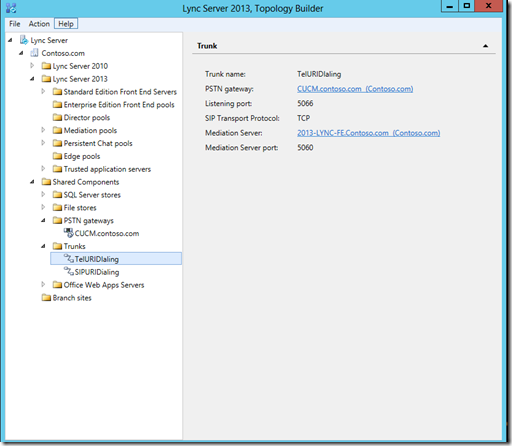
If creating two trunks in Lync 2013 the individual trunks are identified by the inbound port on the gateway side of the configuration (in our case CUCM).
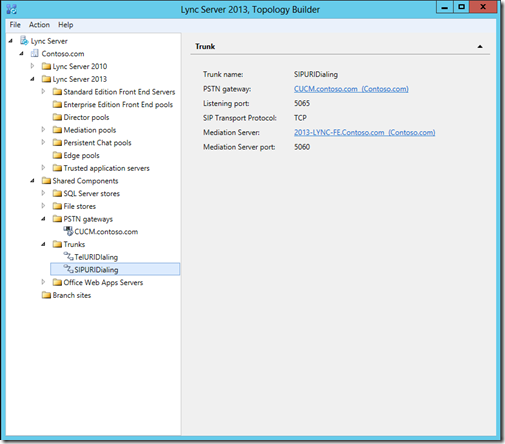
The trunk configuration is then completed in the Lync Control Panel or PowerShell. Below are a couple of screen shots for the configuration I completed in my lab but for more complete details on setting up a SIP trunk to CUCM refer to this document http://www.microsoft.com/en-us/download/details.aspx?displaylang=en&id=26800. Although this document refers to Lync 2010 a lot of the same rules apply to 2013. Also keep in mind there are variances in the exact setup according to the version of CUCM you are using. In my example lab REFER is support by CUCM 8.6 so I left it as enabled but other versions this will differ. Use this link to match your CUCM version setting requirements http://technet.microsoft.com/en-us/lync/gg131938.aspx.

Trunk settings for encryption, enable media bypass and REFER for CUCM 8.6.
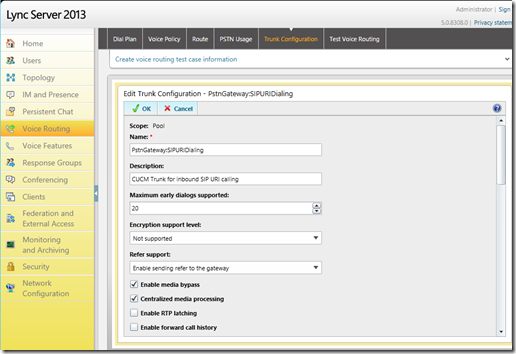
The last time I posted this info Alex Lewis asked the question about “You say the DID can be the same in Cisco and in Lync but if I'm in Lync and dial another user then only their Lync endpoint will ring.” Well thanks to an Anonymous tipster I believe that we have somewhat of a solution to this. There is an attribute that can be added to the users Tel URI that will stop Lync from doing the usual RNL behavior. This means that any call to the users extension can be routed to CUCM regardless of whether its configured in Lync as the user line URI while allowing the RDP in CUCM to ring the Lync client. Now this is by no means a perfect solution. There is potential hair pinning of calls through Lync to CUCM and back to Lync. While this has the potential to consume some extra resources its not going to be life threatening in most cases. Its just a matter of planning for it and understanding call flows in your environment.
What you potentially end up with is a Line URI that looks like this:
tel:+12345678;ext=5479;ms-skip-rnl
The ms-skip-rnl is what will cause Lync to pass the call directly out to CUCM rather than follow normal reverse number look up behavior for calls to be routed to users. This attribute is actually used else where in the product for certain functions such as CAC and RCC so its not a total mystery of its existence but this is not its normal use.
Lastly I just want to mention, use this configuration at your own risk. This is not the usual configuration that one would follow in setting up Lync. When calling in a support ticket this attribute may be required to be removed if you are having issues. As my friend and college Doug wrote to me in an email exchange “The mechanism that it leverages will probably remain in the product forever but, if they called support, the engineer would probably go, “huh?”. I think you get the idea now.
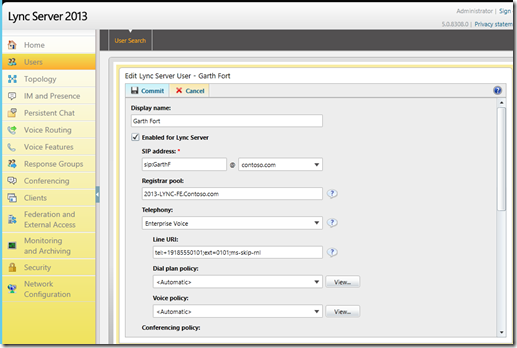
How do I configure CUCM?
In my testing I was using CUCM 8.6 so your settings may vary depending on the version you have.
SIP Trunk
The thing with this configuration is that you are creating a SIP trunk for one purpose and that is to ship messages with headers that have the “to” field with a SIP URI format to Lync. So LyncUser1@contoso.com as an example.
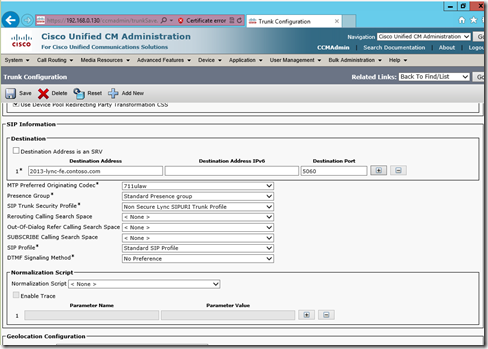
Your Tel URI and SIP URI SIP trunks can share the same SIP Security Profile and outbound ports to Lync but you will need to use different DNS/SRV names or IP address DNS name combinations. So as an example:
SIP URI Trunk – FQDN – 2013-lync-fe.contoso.com
Tel URI SIP Trunk – IP Address 192.168.0.170
Below is my trunk configuration for my SIP URI routing with a FQDN for my Lync 2013 Mediation Server.
SIP Profile for calling out a specific listening port:
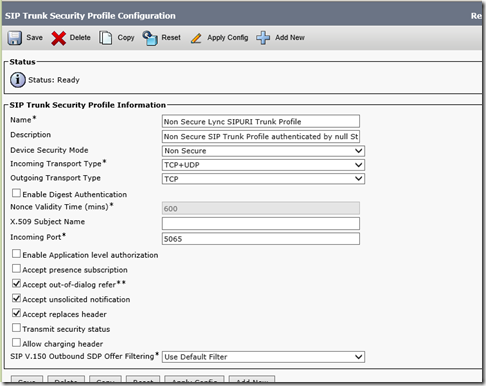
In my case I used a IP address on one trunk for Tel URI calling and the FQDN on the SIP URI trunk. Now if you are not that fixed on configuring route groups and route lists for the SIP trunk connecting to Lync you can configure the trunk directly on both DID and SIP URI route patterns and just have one trunk. I tried both in my lab and it worked either way.
In this 2013 update I changed around my configuration somewhat to route to separate trunks that have separate port numbers as well. Like I said earlier this give the ability to create more control at either end of the trunk on either Lync or CUCM.
SIP Route
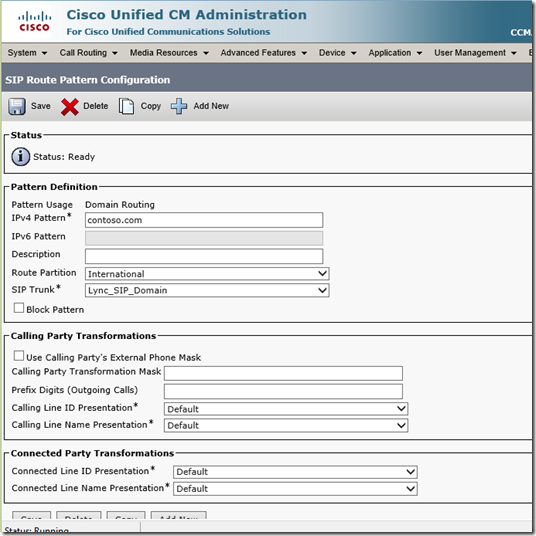
Probably the new piece of configuration to most people will be the SIP route itself. Its pretty easy to configure. See below. I created a domain route to contoso.com to route my SIP URI traffic that I setup for my users on their Remote Destinations.
User Setup
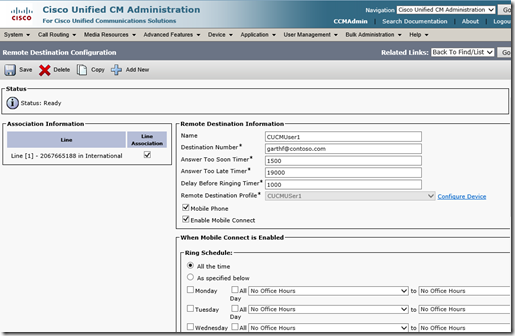
As far as the user setup goes the only variation between the standard setup mentioned in the guide I referenced earlier is to configure the user with a SIP address to route calls in the Destination Number under Remote Destination configuration. In my case I used garthf@contoso.com as my destination number rather than a DID or other number.
This configuration is probably one of the most important interoperability pieces I have written in a while. I can see this alleviating quite a few issue I have come across in the field and hopefully this article will get good circulation so more people know about it. If I look over all the possible ways to do interoperability between Lync and CUCM (RCC, Plugins etc, etc) this really does give the best of both worlds without sacrificing one for the other unlike other methods like plugins which ruin the Lync UI experience. There are some complexities for the initial setup but at the end of the day your using the features available of both products without the use of third parties or additional servers. Call it the biggest bang for your buck if you will.
If folks need more explanation please feel free to post your questions. Cisco’s Unified Mobility can be a pain to setup first time around but funnily enough the Microsoft guide does a really good job of walking through the configuration. I can’t say the same of Cisco’s.
VoIPNorm